AI search visibility is how often tools like ChatGPT and Google AI Overviews mention, recommend or link to your business when people ask questions. You can check it yourself in about an hour: list the questions your customers ask, run them in each tool, and record whether you appear. Then confirm in your analytics and robots.txt that these tools can reach your site and that you can see the traffic they send.
Key takeaways
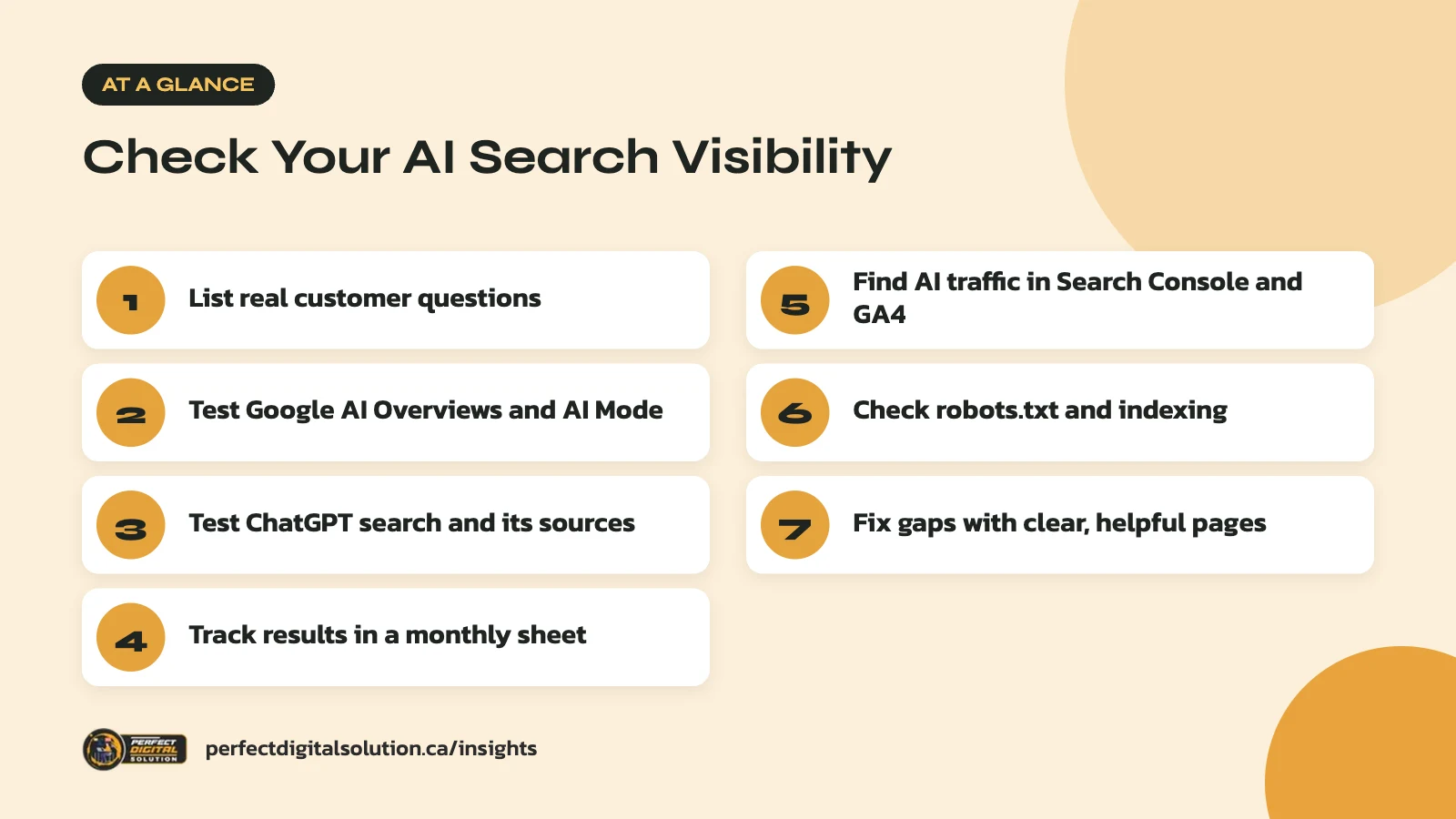
- Test 15 to 25 real customer questions, not just your brand name.
- Check Google AI Overviews and ChatGPT search separately.
- Log results in a simple sheet and repeat the test each month.
- Look for chatgpt.com referrals in GA4; AI Overview clicks sit in Search Console.
- Don’t block Googlebot or OAI-SearchBot in robots.txt.

What AI search visibility means for your business
AI search visibility means your business shows up inside AI-written answers, either named in the text or cited as a source link.
When someone asks Google “best HVAC company in Edmonton for a furnace repair” or asks ChatGPT “which accounting software works for a small Canadian business,” they often get a written answer before any list of links. If your business is named or linked in that answer, you gain trust and clicks. If competitors are named and you are not, you may never get a chance to compete.
Google started the full rollout of AI Overviews in Canada in October 2024. ChatGPT can also search the web and show cited sources in its answers. Both now play a role in how Canadians research products and services.
There is no single dashboard that shows your AI search visibility across every tool. So the best approach is a mix of manual testing and the data you already have.
Step 1: Build a list of questions your customers really ask
Your test is only useful if it uses the same questions real customers type or speak.
Aim for 15 to 25 questions in three groups:
- Service and location questions: “Who does kitchen renovations in Halifax?” or “Best family dentist near Kanata.”
- Problem questions: “Why is my furnace blowing cold air?” or “How do I register a small business in Alberta?”
- Comparison questions: “Is [your brand] or [competitor] better for small teams?”
Pull ideas from your sales calls, customer emails, Google Search Console queries and the “People also ask” boxes in Google. Include a few brand questions too, such as “What does [your business] do?” to see how AI tools describe you.
Step 2: Check Google AI Overviews and AI Mode
To check Google, search each question and note whether an AI Overview appears and whether your site is named or linked.
Use a private browser window so your past searches have less effect, and search from the city you serve. A Calgary business should test results as a Calgary searcher would see them. For each question, record:
- Whether an AI Overview appeared at all
- Whether your business is named in the text
- Whether one of your pages appears as a supporting link
- Which competitors or directories are named instead
Don’t worry if many questions show no AI Overview. Google says on its AI features page that AI Overviews only appear when its systems decide they add value beyond regular results. Where available, repeat a few key questions in AI Mode, which is designed for longer questions and comparisons. We covered how AI Mode works in our article on Google AI Mode in Canada.
Step 3: Check ChatGPT search
To check ChatGPT, run the same questions with web search turned on and look at both the answer and the cited sources.
ChatGPT may search the web on its own when a question needs current information, or you can choose Search from the tools menu. Answers that use search can include citations, and a Sources button shows the pages it used. OpenAI notes that ChatGPT may use an approximate location based on your IP address, so test from the region you serve.
Record the same details as you did for Google: named or not, linked or not, and who else appears. Also note anything wrong in how ChatGPT describes your business, such as old hours or services you no longer offer. OpenAI’s own ChatGPT search help page says results and citations can be incomplete, outdated or incorrect, so mistakes are worth tracking.
AI answers can change from one search to the next. Run each important question two or three times and note whether you appear consistently or only sometimes.
Step 4: Track your AI search visibility in a simple sheet
A basic spreadsheet is enough to track results over time and spot patterns.
| Question | Tool | Mentioned or linked? | Who else appears |
|---|---|---|---|
| Best roofer in Red Deer | Google AI Overview | Linked, not named | Two competitors, one directory |
| Best roofer in Red Deer | ChatGPT search | Not mentioned | Three competitors |
| How long does a roof replacement take? | Google AI Overview | Named and linked | One competitor |
Repeat the test once a month with the same questions. Over a few months you will see which topics you own, which ones competitors own, and whether your changes are working. Note the date of each test, since both tools change often.
Step 5: Use Search Console and GA4 to find AI traffic
Your existing analytics can show some of the traffic AI tools send, even though they can’t show every mention.
Google Search Console
Google says sites that appear in AI features are included in the overall search traffic in Search Console, under the “Web” search type in the Performance report. It does not split AI Overview clicks into their own line. So watch the pages and queries that match your test list, and compare trends over time.
Google Analytics 4
OpenAI’s publisher FAQ says ChatGPT automatically adds utm_source=chatgpt.com to referral links. In GA4, open the Traffic acquisition report and look for chatgpt.com as a session source. Check which landing pages these visitors reach and whether they fill out forms or buy. Other AI assistants may also show up as referral sources, so review your referral list regularly.
Step 6: Make sure AI tools can reach your site
If crawlers can’t access your pages, AI tools can’t cite them, so check your robots.txt and index status.
For Google, there are no extra requirements to appear in AI Overviews or AI Mode. A page must be indexed and eligible to show in Google Search with a snippet. That means a page with a noindex or nosnippet rule will not be used as a supporting link. Our technical SEO checklist walks through the indexing checks.
For ChatGPT, OpenAI’s crawler documentation explains that OAI-SearchBot is the crawler used to show websites in ChatGPT search results. Sites that block it won’t appear in ChatGPT search answers, though they may still appear as navigational links. GPTBot is a separate crawler used for model training, and each setting works independently.
Many businesses block AI crawlers without knowing it, through a security plugin or a firewall setting. Some also block Google-Extended to opt out of Gemini training. Google says Google-Extended does not affect inclusion or ranking in Google Search, so blocking it won’t remove you from AI Overviews.
Step 7: What to do if AI tools don’t mention you
If you are missing from AI answers, focus on clear, helpful pages and consistent business information rather than special tricks.
Google says you don’t need new files, special markup or AI text files to appear in its AI features. The same SEO basics apply. In our experience, the businesses that show up most often have a few things in common:
- A dedicated page for each main service and location, with clear facts
- Pages that answer common customer questions directly, near the top
- The same name, address, phone and hours across their site and Google Business Profile
- Mentions on trusted local sites, industry directories and news sources
For a deeper look at these tactics, read our guide to generative engine optimization. Then rerun your visibility test in a month to see what changed.
How Perfect Digital Solution can help
Our AI search optimization service includes a visibility check across Google AI features and ChatGPT, a technical review of crawler access, and a plan for the content gaps we find. Contact us if you would like help reviewing your results.
Related reading: Schema Markup for AI Search: Which Structured Data Actually Helps.
Frequently asked questions
Sources
- AI features and your website – Google Search Central
- AI Overviews in Search are coming to Canada – Google Canada Blog
- Overview of OpenAI crawlers – OpenAI
- ChatGPT search – OpenAI Help Center
- Publishers and developers FAQ – OpenAI Help Center
- Overview of Google crawlers and fetchers (Google-Extended) – Google Search Central
Written by the Perfect Digital Solution team. We use AI tools to support research and drafting, and every fact in this article is checked by our team against the sources listed above.